



Display and Control
There is 1 product.Shop by type
Display and Control products
-
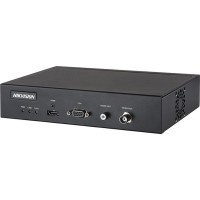
Hikvision DS-6901UDI
4K Decoder Provides HDMI, VGA, and BNC output interfaces. Up to 4K (3840 × 2160@30Hz) via HDMI output interface. H.265+/H.265, H.264+/H.264, Hik264, MPEG4 and MJPEG video compression. PS, RTP, TS, ES, HIK encapsulation formats. Three encoding levels: baseline, main, and high-profile. G.722, G711A, G726, G711U, MPEG2-L2, and AAC audio compression.
Rs 22,010Out of stock
Display and Control: Unleashing the Power of Visuals
In the digital landscape, visuals reign supreme. Engaging audiences with captivating displays and ensuring seamless control over their experience are crucial for success. Whether you're crafting a compelling website, designing an interactive application, or showcasing your brand in a memorabl...
Display and Control: Unleashing the Power of Visuals
In the digital landscape, visuals reign supreme. Engaging audiences with captivating displays and ensuring seamless control over their experience are crucial for success. Whether you're crafting a compelling website, designing an interactive application, or showcasing your brand in a memorable way, understanding the fundamentals of display and control is paramount. This comprehensive guide will delve into the key aspects of display and control, equipping you with the knowledge to elevate your digital presence.
Key Concepts in Display and Control
At the heart of effective display and control lie fundamental concepts that shape how information is presented and how users interact with it. Let's explore these core principles:
1. User Interface (UI) Design: Shaping the Interaction
UI design is the art and science of crafting interfaces that are both visually appealing and intuitive to use. It's about creating a seamless experience that allows users to navigate effortlessly and achieve their desired outcomes. Here are key considerations:
- Visual Hierarchy: Organizing elements based on their importance to guide the user's attention.
- Consistency: Maintaining a consistent visual style throughout the interface for ease of use.
- Accessibility: Ensuring the interface is accessible to users with disabilities.
- Feedback: Providing clear visual and auditory feedback to users as they interact with the interface.
2. User Experience (UX) Design: Optimizing for User Satisfaction
UX design goes beyond aesthetics and focuses on the overall experience users have with a product or service. It's about understanding user needs, creating solutions that meet those needs, and maximizing user satisfaction. Key aspects include:
- User Research: Understanding user needs, behaviors, and pain points through research and data analysis.
- Information Architecture: Structuring content and navigation in a way that is easy to understand and navigate.
- Usability Testing: Gathering feedback from users to identify areas for improvement.
- Iterative Design: Continuously improving the user experience based on feedback and data.
Advanced Display and Control Techniques
Beyond the fundamentals, let's delve into advanced techniques that can enhance your display and control capabilities:
1. Responsive Design: Adapting to Diverse Devices
Responsive design ensures that your website or application looks and functions flawlessly across a multitude of devices, from smartphones and tablets to desktops. This is achieved by using CSS media queries, which allow you to adjust layout, font sizes, and other elements based on screen size and orientation.
2. Interactive Elements: Engaging User Interaction
Interactive elements, such as buttons, sliders, and animations, can significantly enhance user engagement. They provide a more dynamic and responsive experience, making your content more engaging and interactive. Consider using:
- Click-to-Reveal: Hiding content until the user clicks on a specific element.
- Scroll Animations: Animating elements as the user scrolls down the page.
- Parallax Scrolling: Creating a depth effect by moving background elements slower than foreground elements as the user scrolls.
3. Data Visualization: Presenting Insights Visually
Data visualization is a powerful technique for presenting complex data in a clear and engaging way. Charts, graphs, and maps can effectively convey trends, patterns, and insights, making data more accessible and understandable.
MB Communication: A Partner in Display and Control Excellence
MB Communication understands the critical role that display and control play in the success of any digital venture. We provide comprehensive solutions that blend aesthetics, usability, and cutting-edge technology to create immersive and impactful experiences. Whether you're looking to design a captivating website, develop an interactive application, or enhance your brand's visual identity, MB Communication is your trusted partner in delivering excellence.
Conclusion
Mastering the art of display and control is essential for success in the digital world. By understanding the key concepts and implementing advanced techniques, you can create compelling experiences that engage users, drive conversions, and elevate your brand's presence. From UI/UX design to responsive layouts, interactive elements, and data visualization, the possibilities are endless. Partner with MB Communication to unlock the full potential of display and control for your digital journey.